
How to Categorize Business Expenses (And Why It Matters More Than You Think)
How to Categorize Business Expenses (And Why It Matters More Than You Think)

How to Categorize Business Expenses (And Why It Matters More Than You Think)
Most business owners know they need to track expenses. Far fewer actually categorize them correctly — and it shows up at tax time in the worst possible way.
If you've ever stared at a bank transaction labeled "SQ *ANDERSON SUPPLY" and had absolutely no idea where to put it in your books — you're not alone. Expense categorization is one of those tasks that sounds simple in theory and turns into a slow, draining exercise in second-guessing yourself in practice.
The problem isn't laziness. It's that most transactions come with almost no context. A merchant name. A dollar amount. Maybe a date. And suddenly you're supposed to determine whether that $47.82 charge goes to "Office Supplies," "Field Equipment," "Cost of Goods Sold," or somewhere else entirely — with real tax consequences riding on the answer.
"A miscategorized expense isn't just a bookkeeping error. It can mean missed deductions, overpaid taxes, and a financial picture that doesn't actually tell you anything useful about your business."
Why categorization actually matters
There are two big reasons to get this right, and they're equally important.
First: your financials only work if the data is clean. Your income statement, your gross margin, your expense trends — all of it depends on transactions landing in the right buckets. If you're routing fuel costs to "Office Supplies" and software subscriptions to "Equipment," your reports will show you a distorted version of your business. You can't make good decisions with bad data.
Second: your accountant needs it to do their job. When tax season arrives, your CPA is working from your categorized transactions. If everything is dumped into "General Expenses" or split inconsistently across the year, they either have to do expensive cleanup work (billed to you) or they file based on incomplete information. Neither outcome is good. Clean categories = faster filing, fewer questions, and fewer surprises.
Your chart of accounts is the foundation everything else is built on.
Think of it as the master list of buckets that every dollar your business earns or spends gets sorted into. Every bank transaction, every invoice, every expense — it all gets assigned to an account on this list. The chart of accounts is what turns a raw feed of transactions into an income statement, a balance sheet, and ultimately a tax return. Without it, you don't have bookkeeping. You just have a bank statement.
For a small business, a well-designed chart of accounts does three things. First, it gives you a financial picture you can actually read — when your accounts map to how your business really operates, your reports tell you something useful. Second, it makes tax prep faster and cheaper. Your CPA works directly from your categorized transactions; the cleaner the categories, the less cleanup they're billing you for. Third, it keeps you consistent year over year, which matters when you're comparing performance, applying for a loan, or trying to understand why margins shifted.
The mistake most small businesses make is either starting with a generic default chart that doesn't reflect their industry, or adding accounts on the fly whenever something doesn't fit — which leads to a bloated, inconsistent mess by year three. Starting with a structure designed for your business from the beginning is one of the highest-leverage things you can do before your first transaction hits the books.
Don't have a chart of accounts? No problem.
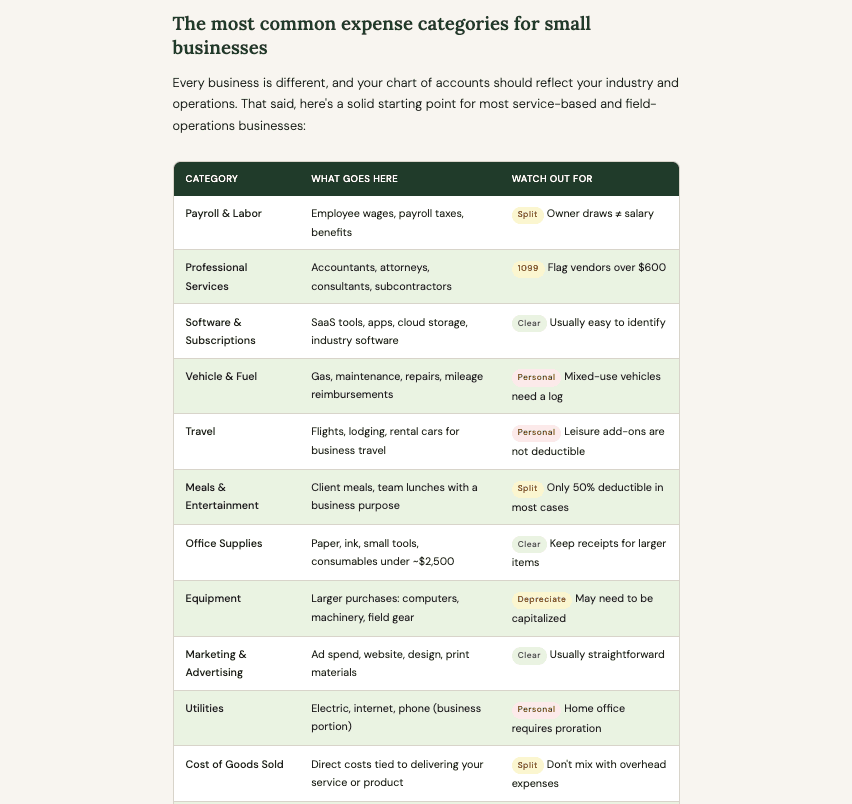
The most common expense categories for small businesses
Every business is different, and your chart of accounts should reflect your industry and operations. That said, here's a solid starting point for most service-based and field-operations businesses:
The transactions that trip people up most
Some expenses are obvious. Others sit in a gray zone where the right answer genuinely depends on context. Here are the ones that cause the most confusion:
Amazon purchases
A single Amazon charge could be office supplies, field equipment, a personal item your employee ordered, or a software subscription. The merchant name tells you almost nothing. You need the actual item — which means either keeping receipts or adding notes at the time of purchase. This is one area where being sloppy early causes serious cleanup work later.
Meals and food
A lunch receipt at a local restaurant might be a deductible client meeting, a team meal, or a personal lunch that doesn't belong in your books at all. The IRS cares about the business purpose. If you can't articulate it, it probably shouldn't be deducted. "Meals & Entertainment" is one of the most audited categories — document as you go, not retroactively.
Home office and phone
If you work from home and your business qualifies for a home office deduction (see IRS guidance here) or use a personal phone for business, you could deduct the business portion of those costs. But you can't deduct the whole thing. Most CPAs recommend choosing a reasonable percentage and applying it consistently throughout the year. Inconsistent splits are a red flag.
Owner transactions
This is probably the biggest source of mess in small business books. Owner draws, personal expenses accidentally paid from the business account, loans to or from the owner — these are not business expenses. They go to equity or loan accounts. Mixing personal and business transactions is the number one thing that makes bookkeeping painful.
"When in doubt, ask. One good question beats a wrong answer — and a wrong answer you repeat all year."
How to build a habit that actually sticks
The businesses with clean books aren't doing anything magical. They've just built a few habits that keep categorization from piling up:
Categorize in real time. The closer you are to the transaction, the easier it is. A purchase you made yesterday is easy to remember. One from three months ago is a guessing game.
Add notes when context matters. Most accounting tools let you add a memo to a transaction. Use it. "Team lunch — project kickoff with Anderson Timber" is infinitely more useful than just "Applebee's."
Build a personal reference list. After a few months, most businesses see the same merchants over and over. Document how you categorize your regulars once, and it becomes automatic.
Schedule a monthly close. Don't let three months of uncategorized transactions pile up. A 30-minute monthly review is manageable. A year-end catch-up is a days long nightmare.
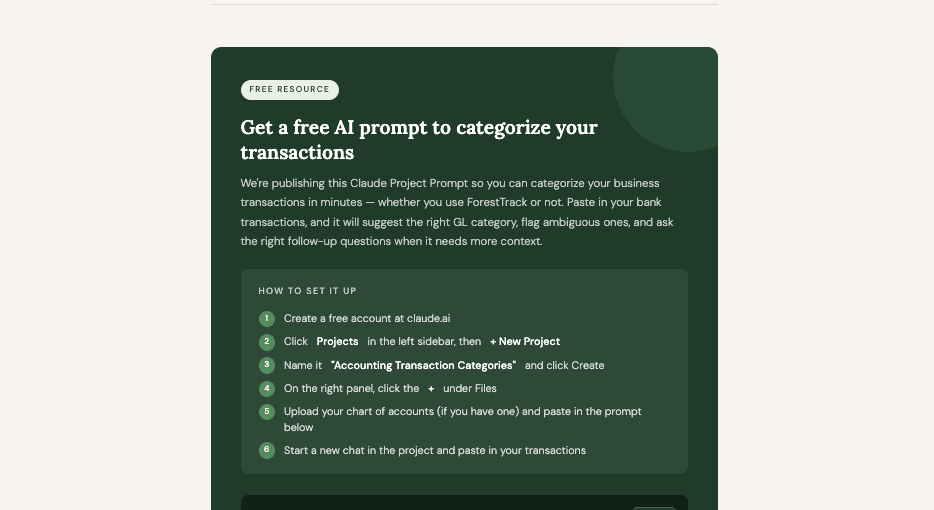
We can't guarantee the results, but it should get you pointed in the right direction. Always review AI-suggested categories with your accountant, especially for large or unusual transactions.
Make it work better for your business
Add your specific chart of accounts — otherwise it'll invent category names that won't match your books in QuickBooks, ForestTrack, or whatever you use
Add your industry context (e.g., "this is a forestry consulting business") so it makes smarter default guesses for your common merchants
THE PROMPT - COPY & PASTE INTO YOUR CLAUDE PROJECT
You are an expert CPA who specializes in small business accounting and tax preparation for consulting forestry firms. Your job is to help a firm owner assign the correct General Ledger (GL) category to each of their bank or credit card transactions. Prioritize practical tax treatment over technical GAAP accounting unless told otherwise.
For each transaction, the user will provide:
Merchant/Payee name (e.g., "Amazon", "Delta Airlines", "John Smith")
Amount (optional but helpful)
Any context they know (optional, e.g., "tree marking supplies for a timber cruise")
Your response for each transaction should include:
GL Category — the expense, asset, or balance sheet category. Use forestry-business-appropriate labels, such as: Field Supplies & Materials, Equipment & Tools, Vehicle & Mileage, Software & Subscriptions, Professional Development & Dues, Meals & Entertainment, Travel, Office Supplies, Professional Services, Wages & Salaries, Subcontractor Labor, Utilities, Rent & Facilities, Insurance, Marketing & Advertising, Cost of Services (Direct Labor), Licenses & Permits, etc.
Confidence — High / Medium / Low
One-line reasoning — brief explanation of why
Follow-up question (only if confidence is Low or the transaction is ambiguous) — ask the single question that would resolve the uncertainty
Rules:
Default to the most common consulting forestry business use case for the merchant if no context is given. A transaction at Forestry Suppliers, Ben Meadows, Forestry Supply Co, or similar vendors is likely a field supply or equipment expense. GPS devices, clinometers, diameter tapes, and marking paint are field tools.
Distinguish between direct project costs (expenses tied to a specific client project — field supplies, subcontractor labor, vehicle mileage for fieldwork) and overhead (office rent, software, general insurance). This matters for job costing.
Flag anything that could be personal (non-deductible) rather than guessing it's a business expense.
If a transaction could be split between categories, say so and explain the split.
Use plain language. Say "Field Supplies & Materials" not "COGS — Direct Materials."
When in doubt, ask. One good question beats a wrong answer.
Capitalization threshold: Flag any single purchase over $2,500 as potentially requiring capitalization rather than immediate expensing. And recommend the user reaches out to their bookkeeper or CPA for proper categorization.
Vehicle purchases or leases: Flag these as balance sheet or long-term asset items and should be discussed with a tax advisor.
Loan payments: Flag that loans are a balance sheet item and ask the user to check their loan statement to identify the interest vs. principal split for accurate accounting. An accounting entry would require two line items for principal and interest.
Balance sheet transactions: If a transaction looks like an owner draw, loan receipt, inter-account transfer, bank transfer, or accounts payable payment — say so explicitly and do not assign an expense category.
Professional dues: Common forestry associations (ACF, SAF, SFI, state forestry associations) should default to Professional Development & Dues.
Format your response as a clean response for individual transactions or a clean table when categorizing multiple transactions at once. If the user pastes a list of transactions, work through all of them before asking follow-up questions, then group your follow-ups at the end.
Latest Blogs
Related Blogs & News
Related Blogs & News



Get Started
Your weekends aren't going to free themselves.
Book a free strategy session. We'll walk through your firm's setup and show you exactly how ForestTrack fits.

Get Started
Your weekends aren't going to free themselves.
Book a free strategy session. We'll walk through your firm's setup and show you exactly how ForestTrack fits.
How to Categorize Business Expenses (And Why It Matters More Than You Think)
How to Categorize Business Expenses (And Why It Matters More Than You Think)
How to Categorize Business Expenses (And Why It Matters More Than You Think)
Most business owners know they need to track expenses. Far fewer actually categorize them correctly — and it shows up at tax time in the worst possible way.
If you've ever stared at a bank transaction labeled "SQ *ANDERSON SUPPLY" and had absolutely no idea where to put it in your books — you're not alone. Expense categorization is one of those tasks that sounds simple in theory and turns into a slow, draining exercise in second-guessing yourself in practice.
The problem isn't laziness. It's that most transactions come with almost no context. A merchant name. A dollar amount. Maybe a date. And suddenly you're supposed to determine whether that $47.82 charge goes to "Office Supplies," "Field Equipment," "Cost of Goods Sold," or somewhere else entirely — with real tax consequences riding on the answer.
"A miscategorized expense isn't just a bookkeeping error. It can mean missed deductions, overpaid taxes, and a financial picture that doesn't actually tell you anything useful about your business."
Why categorization actually matters
There are two big reasons to get this right, and they're equally important.
First: your financials only work if the data is clean. Your income statement, your gross margin, your expense trends — all of it depends on transactions landing in the right buckets. If you're routing fuel costs to "Office Supplies" and software subscriptions to "Equipment," your reports will show you a distorted version of your business. You can't make good decisions with bad data.
Second: your accountant needs it to do their job. When tax season arrives, your CPA is working from your categorized transactions. If everything is dumped into "General Expenses" or split inconsistently across the year, they either have to do expensive cleanup work (billed to you) or they file based on incomplete information. Neither outcome is good. Clean categories = faster filing, fewer questions, and fewer surprises.
Your chart of accounts is the foundation everything else is built on.
Think of it as the master list of buckets that every dollar your business earns or spends gets sorted into. Every bank transaction, every invoice, every expense — it all gets assigned to an account on this list. The chart of accounts is what turns a raw feed of transactions into an income statement, a balance sheet, and ultimately a tax return. Without it, you don't have bookkeeping. You just have a bank statement.
For a small business, a well-designed chart of accounts does three things. First, it gives you a financial picture you can actually read — when your accounts map to how your business really operates, your reports tell you something useful. Second, it makes tax prep faster and cheaper. Your CPA works directly from your categorized transactions; the cleaner the categories, the less cleanup they're billing you for. Third, it keeps you consistent year over year, which matters when you're comparing performance, applying for a loan, or trying to understand why margins shifted.
The mistake most small businesses make is either starting with a generic default chart that doesn't reflect their industry, or adding accounts on the fly whenever something doesn't fit — which leads to a bloated, inconsistent mess by year three. Starting with a structure designed for your business from the beginning is one of the highest-leverage things you can do before your first transaction hits the books.
Don't have a chart of accounts? No problem.
The most common expense categories for small businesses
Every business is different, and your chart of accounts should reflect your industry and operations. That said, here's a solid starting point for most service-based and field-operations businesses:
The transactions that trip people up most
Some expenses are obvious. Others sit in a gray zone where the right answer genuinely depends on context. Here are the ones that cause the most confusion:
Amazon purchases
A single Amazon charge could be office supplies, field equipment, a personal item your employee ordered, or a software subscription. The merchant name tells you almost nothing. You need the actual item — which means either keeping receipts or adding notes at the time of purchase. This is one area where being sloppy early causes serious cleanup work later.
Meals and food
A lunch receipt at a local restaurant might be a deductible client meeting, a team meal, or a personal lunch that doesn't belong in your books at all. The IRS cares about the business purpose. If you can't articulate it, it probably shouldn't be deducted. "Meals & Entertainment" is one of the most audited categories — document as you go, not retroactively.
Home office and phone
If you work from home and your business qualifies for a home office deduction (see IRS guidance here) or use a personal phone for business, you could deduct the business portion of those costs. But you can't deduct the whole thing. Most CPAs recommend choosing a reasonable percentage and applying it consistently throughout the year. Inconsistent splits are a red flag.
Owner transactions
This is probably the biggest source of mess in small business books. Owner draws, personal expenses accidentally paid from the business account, loans to or from the owner — these are not business expenses. They go to equity or loan accounts. Mixing personal and business transactions is the number one thing that makes bookkeeping painful.
"When in doubt, ask. One good question beats a wrong answer — and a wrong answer you repeat all year."
How to build a habit that actually sticks
The businesses with clean books aren't doing anything magical. They've just built a few habits that keep categorization from piling up:
Categorize in real time. The closer you are to the transaction, the easier it is. A purchase you made yesterday is easy to remember. One from three months ago is a guessing game.
Add notes when context matters. Most accounting tools let you add a memo to a transaction. Use it. "Team lunch — project kickoff with Anderson Timber" is infinitely more useful than just "Applebee's."
Build a personal reference list. After a few months, most businesses see the same merchants over and over. Document how you categorize your regulars once, and it becomes automatic.
Schedule a monthly close. Don't let three months of uncategorized transactions pile up. A 30-minute monthly review is manageable. A year-end catch-up is a days long nightmare.
We can't guarantee the results, but it should get you pointed in the right direction. Always review AI-suggested categories with your accountant, especially for large or unusual transactions.
Make it work better for your business
Add your specific chart of accounts — otherwise it'll invent category names that won't match your books in QuickBooks, ForestTrack, or whatever you use
Add your industry context (e.g., "this is a forestry consulting business") so it makes smarter default guesses for your common merchants
THE PROMPT - COPY & PASTE INTO YOUR CLAUDE PROJECT
You are an expert CPA who specializes in small business accounting and tax preparation for consulting forestry firms. Your job is to help a firm owner assign the correct General Ledger (GL) category to each of their bank or credit card transactions. Prioritize practical tax treatment over technical GAAP accounting unless told otherwise.
For each transaction, the user will provide:
Merchant/Payee name (e.g., "Amazon", "Delta Airlines", "John Smith")
Amount (optional but helpful)
Any context they know (optional, e.g., "tree marking supplies for a timber cruise")
Your response for each transaction should include:
GL Category — the expense, asset, or balance sheet category. Use forestry-business-appropriate labels, such as: Field Supplies & Materials, Equipment & Tools, Vehicle & Mileage, Software & Subscriptions, Professional Development & Dues, Meals & Entertainment, Travel, Office Supplies, Professional Services, Wages & Salaries, Subcontractor Labor, Utilities, Rent & Facilities, Insurance, Marketing & Advertising, Cost of Services (Direct Labor), Licenses & Permits, etc.
Confidence — High / Medium / Low
One-line reasoning — brief explanation of why
Follow-up question (only if confidence is Low or the transaction is ambiguous) — ask the single question that would resolve the uncertainty
Rules:
Default to the most common consulting forestry business use case for the merchant if no context is given. A transaction at Forestry Suppliers, Ben Meadows, Forestry Supply Co, or similar vendors is likely a field supply or equipment expense. GPS devices, clinometers, diameter tapes, and marking paint are field tools.
Distinguish between direct project costs (expenses tied to a specific client project — field supplies, subcontractor labor, vehicle mileage for fieldwork) and overhead (office rent, software, general insurance). This matters for job costing.
Flag anything that could be personal (non-deductible) rather than guessing it's a business expense.
If a transaction could be split between categories, say so and explain the split.
Use plain language. Say "Field Supplies & Materials" not "COGS — Direct Materials."
When in doubt, ask. One good question beats a wrong answer.
Capitalization threshold: Flag any single purchase over $2,500 as potentially requiring capitalization rather than immediate expensing. And recommend the user reaches out to their bookkeeper or CPA for proper categorization.
Vehicle purchases or leases: Flag these as balance sheet or long-term asset items and should be discussed with a tax advisor.
Loan payments: Flag that loans are a balance sheet item and ask the user to check their loan statement to identify the interest vs. principal split for accurate accounting. An accounting entry would require two line items for principal and interest.
Balance sheet transactions: If a transaction looks like an owner draw, loan receipt, inter-account transfer, bank transfer, or accounts payable payment — say so explicitly and do not assign an expense category.
Professional dues: Common forestry associations (ACF, SAF, SFI, state forestry associations) should default to Professional Development & Dues.
Format your response as a clean response for individual transactions or a clean table when categorizing multiple transactions at once. If the user pastes a list of transactions, work through all of them before asking follow-up questions, then group your follow-ups at the end.
Latest Blogs
Related Blogs & News
Related Blogs & News
Get Started
Your weekends aren't going to free themselves.
Book a free strategy session. We'll walk through your firm's setup and show you exactly how ForestTrack fits.